
Last updated: 30 April 2026
TL;DR: Log in, choose a plan, fill out your company details, and pay. Vestd takes care of ID checks and submits your incorporation to Companies House — you'll get a confirmation email once it's registered.
Contents📋:
Step 3: Complete incorporation flow
Step 1.
- Log in to Vestd.
- Click on your company name at the top of the page.
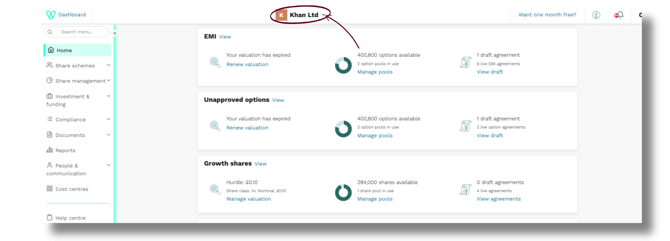
3. Click +Incorporate company from the list.

Step 2:
Choose a plan
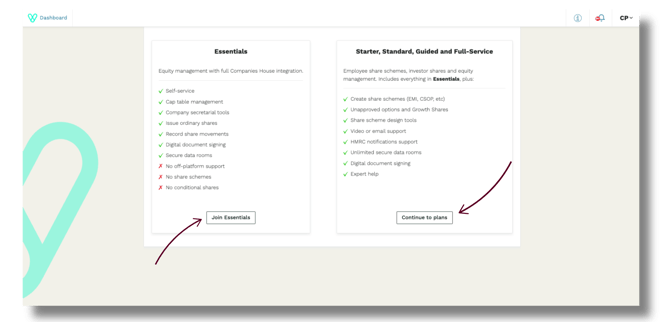
You'll be presented with two options:
- Essentials (£25/month) — our entry-level plan, ideal if you want to incorporate and manage the basics yourself. Click Join Essentials.
- Starter, Standard, Guided, or Full-Service — fuller subscription plans with additional support. Click Continue to plans to explore these. Once you complete the incorporation process, one of our team will reach out to walk you through the subscription options.
Want to talk through the right option for you? Hop on a call.
If you have a company incorporation in progress, you’ll be redirected to the page below. Click Continue incorporation to continue with a company you have already started incorporating. Alternatively, click Start new incorporation for a new company you wish to incorporate.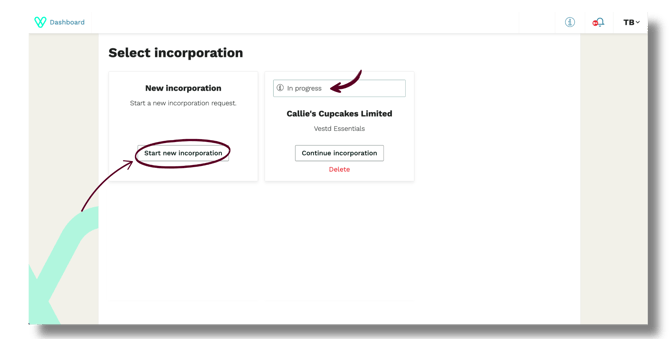
Step 3: Complete the incorporation flow
Whichever plan you choose, you'll fill out the same incorporation flow covering your company details, nature of business, directors, shareholders, and PSCs (Persons with Significant Control).
A one-off £100 incorporation fee is collected on the final page.
Once you submit, Vestd will carry out ID checks before sending your incorporation request to Companies House.
Step 4: Confirmation
After submitting, you'll be taken to your dashboard where a green banner will confirm your incorporation request has been sent to Companies House.
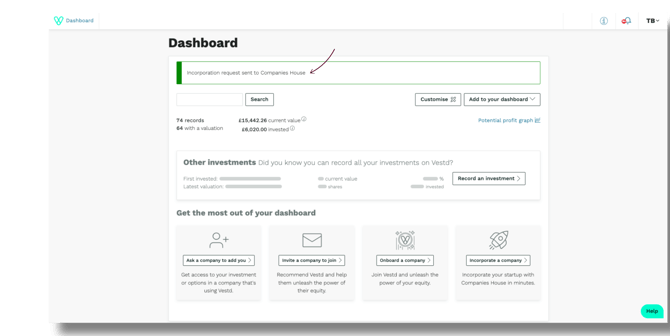
Once your company is successfully registered, you'll receive a confirmation email from us. At that point, remember to register for Corporation Tax within 3 months of starting to trade — the email includes a link with instructions on how to do this.
Need support?
If you have any questions, our dedicated Customer Success team is here to help: support@vestd.com
Not onboard yet? book a call with us.