
Last updated: 21 October 2026
TL;DR: Single sign-on (SSO) allows your team to log in to Vestd, the UK's FCA regulated share scheme and equity management platform, using your organisation's identity provider. SSO is included at no additional cost for all companies on a paid plan, and admins can now set it up themselves. To set up SSO, go to Company settings, find the Admin user box and click Single sign-on, enter your email domain, add your identity provider's details, and verify ownership of the domain with a DNS TXT record. You can switch SSO on, switch it off or remove it at any time.
Vestd supports any identity provider that uses SAML 2.0, including Google Workspace, JumpCloud and Okta. This guide explains each step of the setup process. For information on how your team logs in once SSO is active, see Using Single Sign-on at Vestd.
Contents 📋
- Before you start
- Key terms
- How to set up SSO on Vestd
- Identity provider settings
- How to switch SSO on, off or remove it
- FAQs
- Need support?
Before you start
Single sign-on is available to every company on a paid Vestd plan, at no additional cost.
Before you begin, make sure you have:
- an admin account on Vestd with permission to change Company settings [TBC: confirm the permission level, e.g. Super User]
- admin access to your identity provider (for example, Google Workspace, JumpCloud or Okta), so that you can create a SAML application and copy its details
- access to your domain's DNS (Domain Name System) settings, or a contact in your IT team who can add a TXT record on your behalf
- the email domain your team uses to log in, for example example.com
📌 Note: Your organisation must own the email domain. Vestd will not switch SSO on until the domain has been verified.
Key terms
Single sign-on (SSO). A login method that allows people to access several services with one set of company credentials.
Identity provider (IdP). The service your organisation uses to manage user accounts and logins, such as Google Workspace, JumpCloud or Okta.
SAML 2.0. The industry-standard protocol Vestd uses to exchange login information securely with your identity provider.
Metadata. A set of details from your identity provider that tells Vestd where to send users to log in and how to verify the response. It includes the IdP Entity ID, the login URL and a certificate.
SP Entity ID and Reply URL (ACS). The details Vestd provides for your identity provider. SP stands for service provider, which is Vestd. ACS stands for Assertion Consumer Service, the address your identity provider returns users to after they log in.
Email domain. The part of your team's email addresses after the @ symbol, for example example.com.
TXT record. A short text entry added to your domain's DNS settings. Vestd checks for this entry to confirm that your organisation owns the domain.
How to set up SSO on Vestd
Complete the following steps in order. SSO is not switched on until the final step, so your team's login process does not change while you complete the setup.
Step 1: Add your email domain
- Log in to Vestd.
- Go to Company settings, then select Single sign-on.
- In the Email domain field, enter the domain your team uses to log in, for example example.com.
- Select Continue.
Step 2: Connect your identity provider
- Vestd displays the details your identity provider requires, including the SP Entity ID and the Reply URL (ACS). Create a new SAML application in your identity provider and enter these details. For provider-specific guidance, see Identity provider settings below. [TBC: confirm the exact labels on this screen]
- Provide your identity provider's details to Vestd using one of the following options:
- Paste the metadata. Copy the metadata XML from your identity provider and paste it into Vestd. This is the recommended option, as it reduces the risk of errors.
- Enter the details manually. Enter the IdP Entity ID, the login URL and the certificate in the fields provided.
- Click Verify domain to save your details.
Step 3: Verify your domain
- Copy the TXT record that Vestd provides.
- In your domain's DNS settings, create a new TXT record and paste in the value from Vestd. If you do not manage your DNS settings, send the record to the person who does.
- Return to Vestd and select [TBC: button label] to verify the record.
📌 Note: DNS changes can take time to take effect. If we cannot find the record immediately, wait a few minutes and try again. We check each day for 30 days and email editors to verify.
Step 4: Switch SSO on
- Once your domain is verified, select [TBC: button label, e.g. Enable single sign-on].
Your team can now log in to Vestd through your identity provider. [TBC: confirm what changes for existing users, e.g. whether password login remains available]
Identity provider settings
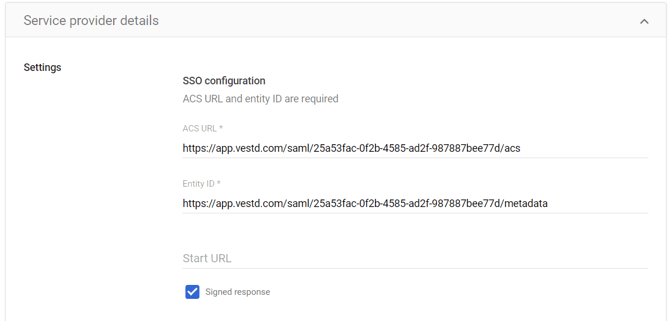
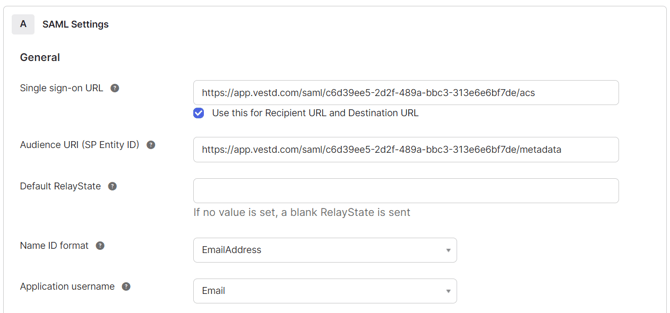
Use the following settings when you create the SAML application in your identity provider, whichever provider you use.
|
Setting |
Value |
|---|---|
|
Name ID format |
|
|
Name ID value |
|
|
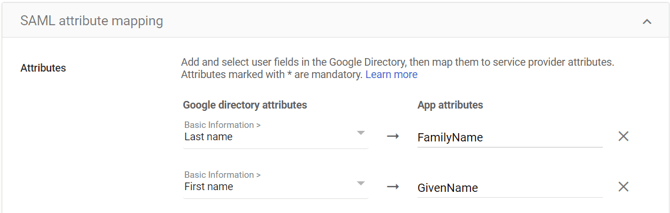
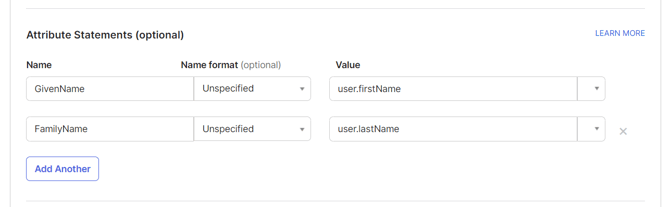
First name attribute |
GivenName |
|
Last name attribute |
FamilyName |
Google Workspace

JumpCloud
If you paste the JumpCloud metadata into Vestd, you do not need to complete the first table.
Details to enter in Vestd
|
In Vestd |
From JumpCloud |
Notes |
|---|---|---|
|
IdP Entity ID |
JumpCloud Metadata URL |
|
|
Login URL |
IdP URL |
|
|
Certificate |
IdP Certificate |
Details to enter in JumpCloud
|
In JumpCloud |
From Vestd |
Notes |
|---|---|---|
|
IdP Entity ID |
– |
Use the JumpCloud Metadata URL |
|
SP Entity ID |
SP Entity ID |
The metadata URL Vestd displays during setup |
|
ACS URLs |
Reply URL (ACS) |
|
|
SAMLSubject NameID |
|
|
|
User attributes |
GivenName = firstname, FamilyName = lastname |
Okta
📌 Note: The Vestd field names above are taken from the previous setup process. [TBC: check them against the new Single sign-on screens]
How to switch SSO on, off or remove it
You can manage SSO at any time from Company settings > Single sign-on.
- Switch SSO off. Your team no longer logs in through your identity provider, but your SSO setup is saved so that you can switch it back on later. [TBC: confirm how your team logs in while SSO is off]
- Switch SSO on. SSO is reactivated using your saved setup.
- Remove SSO. Your SSO setup is deleted, including your email domain and identity provider details. To use SSO again, you will need to complete the setup process from the beginning.
📌 Note: Changes to your SSO settings on Vestd do not affect your identity provider. If you remove SSO, you may also wish to delete the Vestd SAML application from your identity provider.
FAQs
Is there a charge for single sign-on on Vestd? No. SSO is included at no additional cost for all companies on a paid Vestd plan.
Do I need to contact Vestd to set up SSO? No. Admins can set up SSO themselves from Company settings. If you need assistance, our team can help (see Need support? below).
Which identity providers does Vestd support? Vestd supports any identity provider that uses SAML 2.0. This guide includes settings for Google Workspace, JumpCloud and Okta.
Should I paste the metadata or enter the details manually? We recommend pasting the metadata, as it is quicker and reduces the risk of errors. Enter the details manually only if your identity provider does not provide metadata XML.
Why is Vestd unable to find my TXT record? DNS changes can take time to take effect. Check that the record has been added to the correct domain and matches the value from Vestd exactly, then try again after a few minutes.
Can I set up SSO for more than one email domain? We don’t currently support this
How do users outside our email domain log in? They log in as normal. If you want log in to be limited to SSO users, contact support@vestd.com
Need support?
If you have any questions, our dedicated Customer Success team is here to help: support@vestd.com
Not onboard yet? Hop on a call.
Our team, content and app can help you make informed decisions. However, any guidance and support should not be considered as 'legal, tax or financial advice.'