
TL;DR: Once HMRC has agreed your EMI or CSOP valuation, you can record this on Vestd, the UK’s FCA regulated share scheme and equity management platform. Check the values and start date match HMRC’s letter, then upload the letter. Vestd marks the valuation as HMRC approved, stores the letter with it and shows how long you have to grant options at the agreed value.
An HMRC agreed valuation is only valid for a limited period from the date on HMRC's letter. For EMI and CSOP, this is usually 90 days. Recording the letter on Vestd sets the correct start and expiry dates, so you can see how long you have to grant options at the agreed value. It also keeps the letter with the valuation it relates to.
Contents 📋
- Before you start
- A few terms you'll see
- How to add an HMRC approval letter
- What you'll see afterwards
- FAQs
- Need support?
Before you start
You'll need:
- the letter from HMRC agreeing the valuation
- the valuation the letter relates to, already listed on your Valuations page
If the valuation isn't listed on your Valuations page, click New valuation, then:
- if you already have a valuation, for example one prepared by your accountant or adviser, click Record option valuation and enter its details
- if you don't have a valuation yet, complete the New valuation steps. Our team will draft your valuation report and VAL231 form.
A valuation can only be edited until it has been used to grant or exercise options. If the valuation has already been used, contact support@vestd.com.
A few terms you'll see
Actual market value (AMV.): The value per share taking into account any restrictions attached to the shares.
Unrestricted market value (UMV.): The value per share if it had no restrictions attached.
HMRC approved: The label Vestd uses for a valuation HMRC has agreed. HMRC's letter may say "agreed" rather than "approved". Both refer to the same thing.
VAL231: The form used to ask HMRC to agree a valuation for EMI options.
Start date: The date the valuation takes effect. For an HMRC agreed valuation, this is the date on HMRC's letter.
Expiry date: The last date the valuation can be used to grant options.
How to add an HMRC approval letter
- Log in to Vestd.
- In the navigation panel on the left, click Compliance.
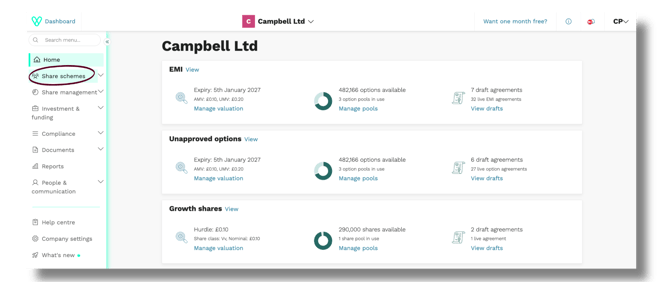
- Then click Valuations.
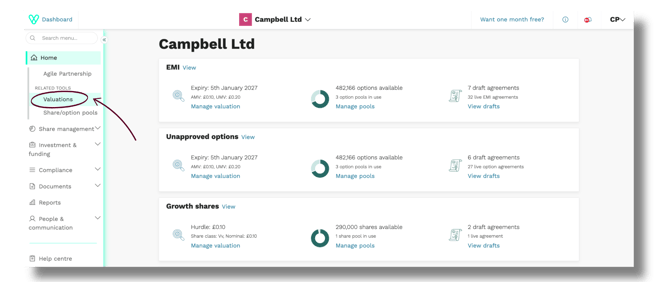
💡 Tip: You can also reach this page from Share schemes > Valuations, or by clicking Manage valuation on the EMI card on your company home page.
3. Find the EMI or CSOP valuation the letter relates to. Check that the AMV and UMV match the values in HMRC's letter.
4. In the Action column, click Edit
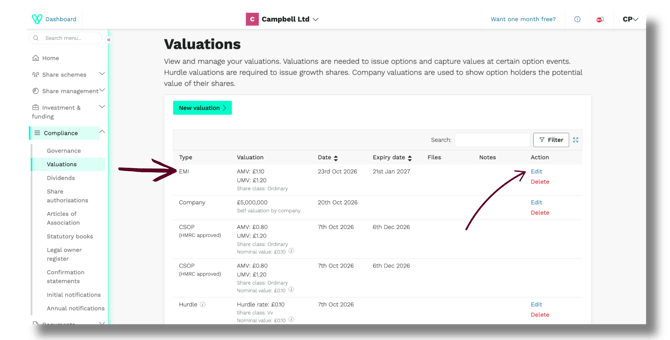
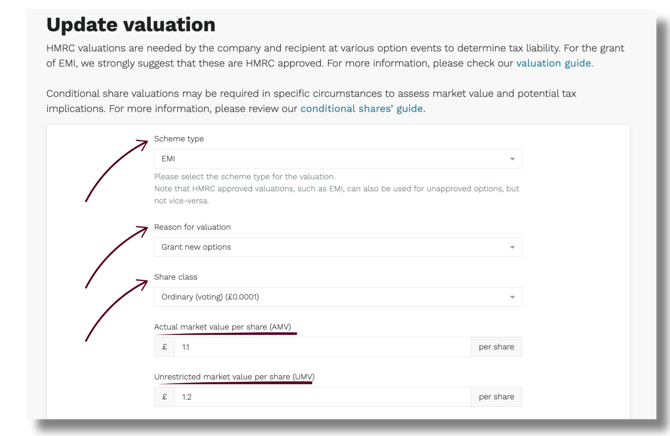
6. From the Reason for valuation drop-down, select Grant new options.
7. Check the Actual market value per share (AMV) and Unrestricted market value per share (UMV) fields. If HMRC agreed different values from the ones shown, update them to match the letter.
8. In the Start date fields, enter the date shown on HMRC's letter.
9. Set the expiry date by ticking Automatically update expiry date to 90 days. The Expiry date fields fill in automatically.

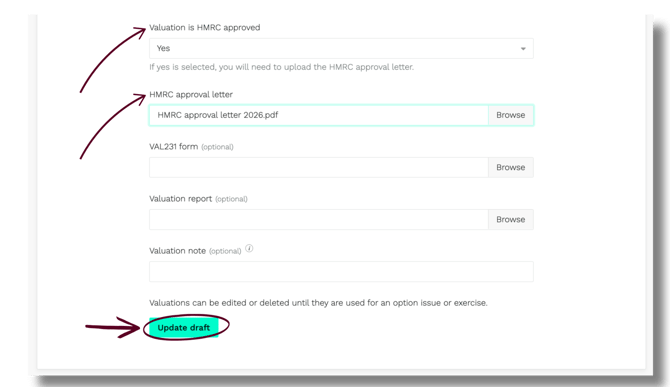
10. In the Valuation is HMRC approved drop-down, select Yes. An HMRC approval letter field appears.
11. In the HMRC approval letter field, click Browse and select the letter from your files.
13. Click Update draft.
What you'll see afterwards
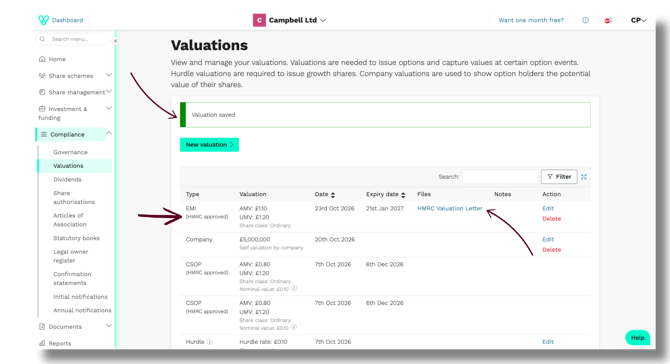
You'll be returned to the Valuations page. A green Valuation saved banner confirms the change.
In the list:
- the Type column shows the scheme followed by (HMRC approved), for example EMI (HMRC approved)
- the Date and Expiry date columns show the dates you entered
- the Files column shows an HMRC Valuation Letter link, which opens the letter you uploaded
FAQs
Why can't I see Edit next to my valuation?
Valuations can't be edited once they've been used to grant or exercise options. Contact support@vestd.com if a used valuation needs updating.
HMRC agreed a different value from the one I submitted. What do I do?
Update the AMV and UMV on the Update valuation page to match HMRC's letter before you save. The values on Vestd should always match the values HMRC agreed.
Can I use an HMRC approved valuation for unapproved options?
Yes. An HMRC approved valuation, such as an EMI valuation, can also be used for unapproved options. A valuation for unapproved options can't be used for EMI.
What happens when the valuation expires?
We recommend obtaining a new valuation when you plan to grant more options.
Which date do I use for the start date?
Use the date printed on HMRC's letter.
Need support?
If you have any questions, our dedicated Customer Success team is here to help: support@vestd.com
Not onboard yet? Hop on a call.
Our team, content and app can help you make informed decisions. However, any guidance and support should not be considered as 'legal, tax or financial advice.'