
Last updated: 21 April 2026
TL;DR: Upload an existing digitised share certificate to Vestd for record keeping alongside your equity movements. It will be marked as "off-platform" and can't be sent for signing through Vestd.
Contents📋:
Before you start
You'll need:
- A digital copy of the share certificate (PDF only, max 10MB)
- The shareholder already added to your company on Vestd
- The relevant share class set up on Vestd
- The share certificate number and the date shown on the certificate
- The right permissions (Admin users with Super User or Editor permissions)
Steps
- Log in to Vestd.
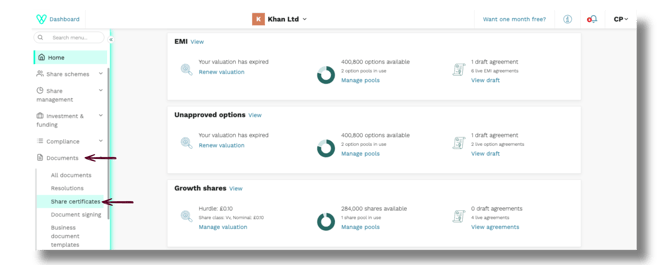
- From your homepage, open the navigation panel and go to Documents > Share certificates.
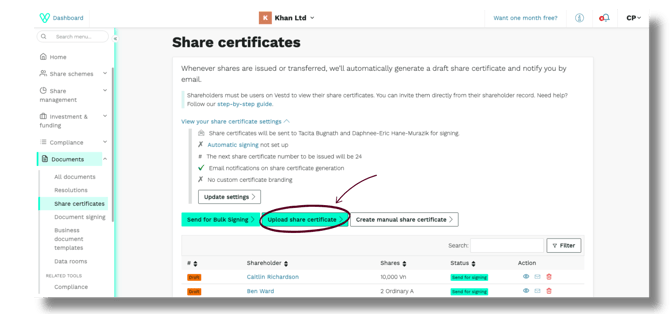
- Click Upload share certificate.
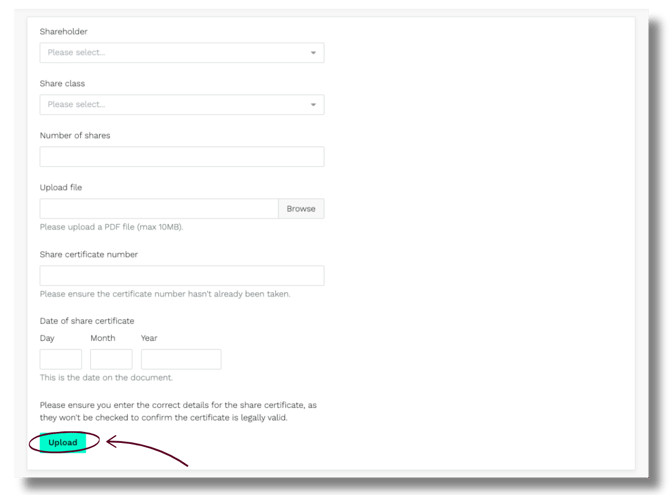
- Fill in the details:
- Shareholder – select from the dropdown
- Share class – select from the dropdown
- Number of shares – enter the amount
- Share certificate – upload the file
- Certificate number – enter the number shown on the certificate
- Certificate date – enter the date shown on the certificate
- Click Upload.
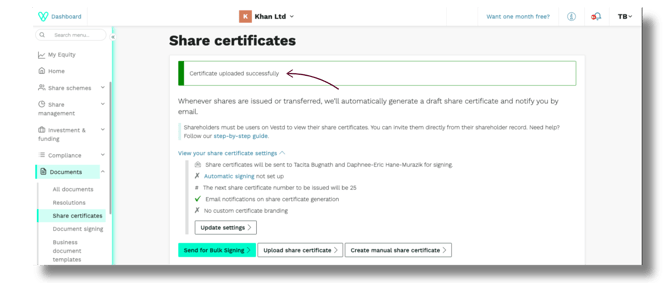
Confirming the upload
- A green banner appears at the top of the Share certificates page confirming a successful upload.
- Scroll down to the Share certificates list. Your new entry will appear with a green "Off-platform" label beneath its certificate number.
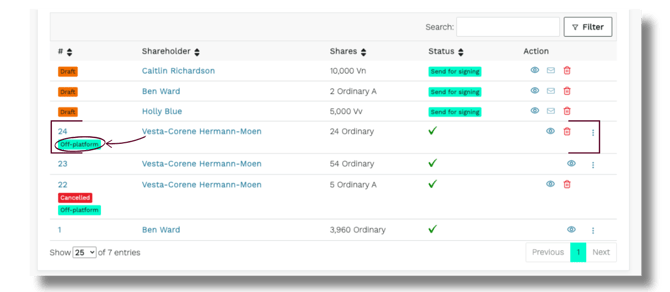
💡 Need to cancel a share certificate? Click the : and click Cancel.
Uploaded vs. Vestd-generated certificates
|
Feature |
Uploaded (off-platform) |
Generated on Vestd |
|
Stored on Vestd |
Yes |
Yes |
|
Can be signed via Vestd |
No |
Yes |
|
Labelled "Off-platform" |
Yes |
No |
|
Best for |
Historical or paper certificates |
New share issuances |
FAQs
Can I send an uploaded certificate for e-signing on Vestd?
No. Off-platform certificates are for record-keeping only. To issue a certificate that can be signed via Vestd, generate one on the platform instead.
Why is my uploaded certificate marked "Off-platform"?
The label simply means the certificate was created outside Vestd and added for record-keeping; it doesn't affect its validity.
Where does the certificate appear after upload?
In the Share certificates list, with a green "Off-platform" label shown beneath its certificate number.
What do I need before I can upload a certificate?
The shareholder and share class must already exist on Vestd, and you'll need the digital file (PDF), certificate number and date to hand.
Which file types and sizes are supported?
PDF only, up to 10MB.
Who can upload a share certificate?
Admin users with Super User or Editor permissions.
Can I delete an uploaded share certificate?
No. To delete share certificates, please contract support@vestd.com
Can I cancel a share certificate?
Yes. Admin users with Super User and Editor permissions can cancel share certificates on Vestd. Once cancelled, the certificate will appear in the list marked "CANCELLED" alongside the date it was cancelled.
Need support?
If you have any questions, our dedicated Customer Success team is here to help: support@vestd.com
Not onboard yet? Hop on a call.