
Last updated: 29/09/2026
TL;DR: If a name on one of your records is wrong, or if someone's legal name has changed, you can update it yourself on Vestd, the UK's FCA regulated share scheme and equity management platform. Open the person's record, edit their name and click Save details. Vestd then asks you a few things: which of that person's records should take the new name, what should happen to any share certificates already issued in the old name, and whether you're certain. Nothing is saved until you confirm. This process corrects the name held for someone already on your records. It doesn't transfer shares and it doesn't replace one person with another. And it will file thes with Companies House
The same person can appear on your records more than once. Someone might be a director, a PSC, and a shareholder, and hold a Vestd account as well. When their name is wrong or changes, all of those records need to agree. Vestd handles this in a single process, and this guide takes you through it from start to finish.
Contents 📋- Before you start
- A few terms you'll see
- How to change a name
- What changes and what stays the same
- Name changes for directors and PSCs
- If the name can't be changed
- FAQs
- Need support?
Before you start
Use this process when the person stays the same and only their name changes. For example:
- the name was entered incorrectly or spelled wrongly
- a shortened name or nickname was used instead of a full legal name
- the person has changed their name by deed poll
- the person has changed their name following a life event (civil partnership, marriage, divorce etc)
Don't use this process to assign an existing shareholding to a different individual. Changing a name doesn't transfer shares. If shares need to go to someone else, that's a stock transfer.
You'll need the person's full legal name, spelled as it appears on their passport or other identity document. This is the name that appears on the company's share register and is used for anti-money laundering checks. For directors and PSCs, it's also the name filed at Companies House.
A few terms you'll see
PSC. A person with significant control. Someone who owns or controls more than 25% of the company, shares or voting rights. PSC details are held on the public register at Companies House.
Draft document. A document Vestd has prepared but that hasn't been issued or signed yet.
Issued document. A document that has already been generated and sent out. This includes signed resolutions and share certificates that have been issued to a shareholder.
Cancel and reissue. Voiding an existing share certificate and generating a replacement in the new name.
Companies House filing. The notification a company is required to send Companies House when the details of a director or PSC change (Vestd does these filings for you).
How to change a name
Follow these steps in order. You can select Cancel at any point before the final step, and nothing will be changed.
- Log in to Vestd.
- In the navigation panel on the left, click People & communication.
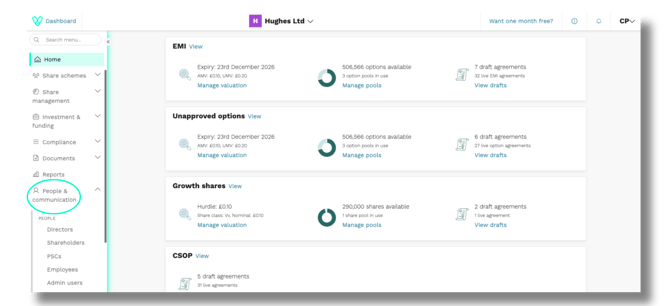
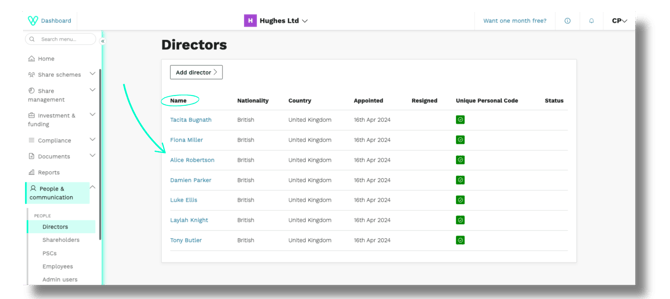
3. Click the type of record you need to update: Directors, Shareholders or PSCs. A list of every record of that type opens.
📌 Note: This process doesn’t currently support changing names on employee records. To change an Employee’s name, contact support@vestd.com
If the individual has more than one record (e.g. Director and Shareholder), Vestd will give you the opportunity to update all of their records later in the process.
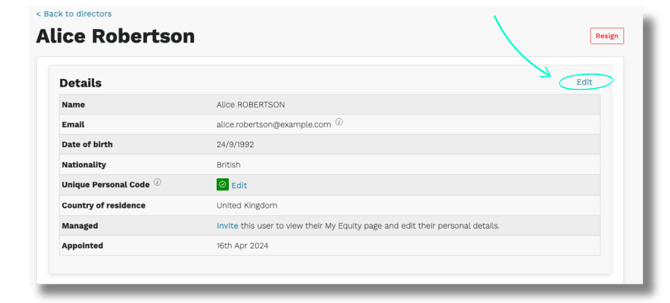
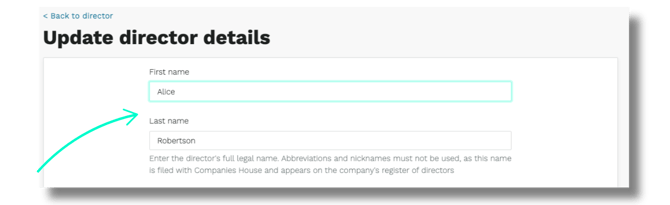
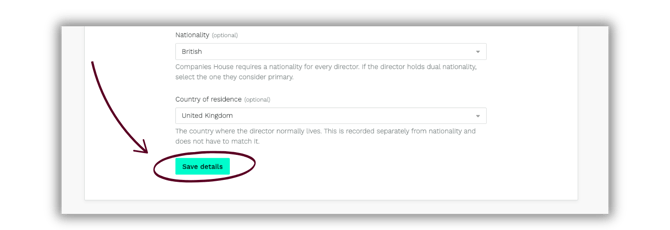
You will see a pop up informing you that we will file the change of director name with Companies House at the end of this process.
This doesn't save the change yet. Vestd now asks you to make a series of decisions before anything is written to your records.
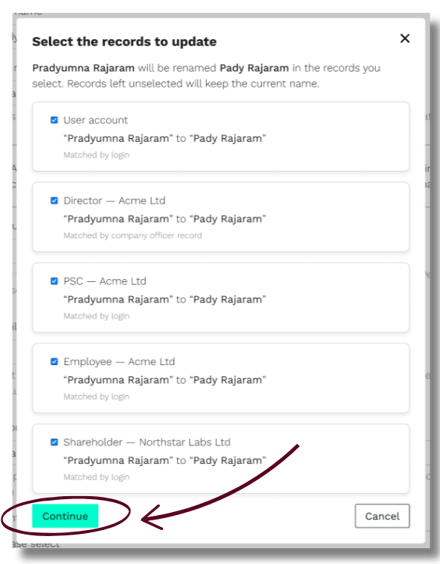
Vestd searches for other records held by the same person and lists them here. Each row shows the record, the company it belongs to, how Vestd matched the record and the name change that will be applied to it.
Tick every record that should take the new name. Untick any record that should keep the current name. Records left unticked aren't changed.
In most cases, tick every record. Your registers should show the same name for the same person.
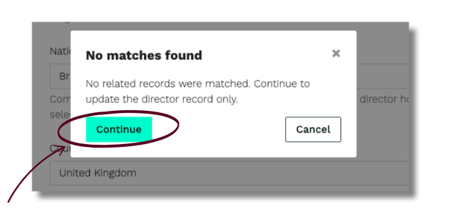
If there are no matching records you will see this popup instead.Click Continue to proceed.
For changing shareholder name:
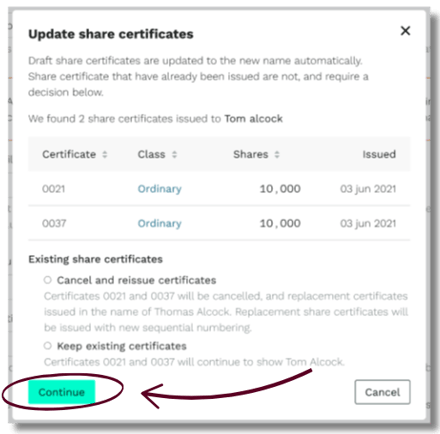
10. If the person holds share certificates that have already been issued, the Update share certificates window opens and lists them. Select one of the following:-
- Cancel and reissue certificates. The listed certificates are cancelled and replaced with new certificates in the new name. Replacement certificates are given new certificate numbers in line with the current sequential order of share certificates issued.
- Keep existing certificates. The listed certificates aren't changed and continue to show the previous name.
📌 Note: share certificates should be updated to reflect shareholder’s current name.
Certificates still in draft are updated to the new name automatically and don't need a decision from you.
12. The Confirm name change window opens. It shows the current name, the new name and a list headed What will change. If Companies House filings are required (CH01 change of director’s details or PSC04 change of person of significant control’s details) we will inform you of the filings here and do these on your behalf once you click Save details.
Read this list before going further. It sets out every record, document and certificate the change affects, and it's your last opportunity to check the change is correct.
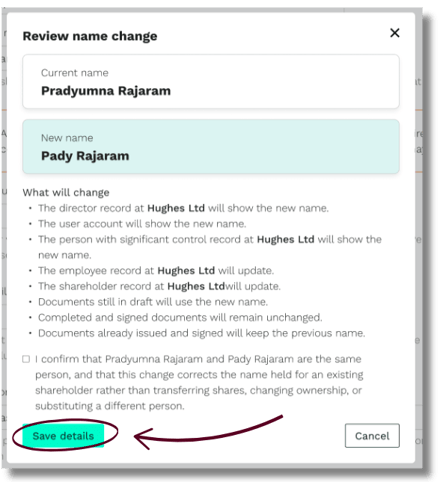
14. Click Save details.
You'll be returned to the individual’s record. A green Details updated banner at the top confirms what happened, for example: "Thomas Alcock now appears on four records. Two certificates were cancelled and replaced. CH01 and PSC04 have been filed to Companies House"
What changes and what stays the same
The following are updated to the new name:
- every record you ticked, including records at other companies you manage in Vestd
- the person's Vestd account, if you ticked it
- documents and share certificates still in draft
- share certificates you chose to cancel and reissue
The following keep the previous name:
- documents that have already been issued and signed
- completed resolutions and agreements
- share certificates you chose to keep
- any record you left unticked
Issued and signed documents keep the name that was correct on the date they were signed, because they're a record of what was agreed at that point. If a document needs to be reissued in the new name, contact our team at support@vestd.com.
A name change affects the name only. Share numbers, share classes, option grants, vesting schedules and email addresses aren't affected.
Name changes for directors and PSCs
The details of directors and PSCs are held on the public register at Companies House. When those details change, the company is required to notify Companies House.
When you change the name on a director or PSC record, Vestd files the change with Companies House on your behalf. You don't need to submit anything separately, and you shouldn't file the same change yourself. Filing twice can create conflicting entries on the public register.
Check the spelling carefully before you confirm. What you enter here is what appears publicly.
Shareholder records aren't held at Companies House, so changing those names doesn't result in a filing.
If the name can't be changed
Vestd checks that the new name is a plausible correction of the existing one. If the new name is substantially different, the change is stopped and you'll be asked to contact our team instead.
This is a safeguard. A completely different name usually means one of two things:
- the record belongs to a different person, in which case the correct action is a stock transfer or a new record rather than a name change
- the person has genuinely changed their name in full, which needs a manual check by our team
If you see this message, click Contact support (or email support@vestd.com) with the record, the current name, the new name and the reason for the change. Our team will make the change for you.
FAQs
Can I change the name on a shareholder record to give the shares to someone else?
No. Changing a name corrects the name held for a person who's already on your records. It doesn't move shares or change who owns them. To move shares to a different person, you must action a Stock transfer.
One individual has multiple records. Do I need to update each record separately?
No. Start from any one of the person's records. Vestd finds their other records and lets you update them all at once.
Is the individual told that their name has changed?
No email is sent when a name is changed. Emails already scheduled, such as resolutions waiting to be signed, go to the email address held on the record, which isn't affected by a name change.
Why has the replacement share certificate been given a different number?
Replacement certificates are issued with new certificate numbers so that a cancelled certificate can't be confused with the one that replaced it. The cancelled number isn't used again. It follows sequential ordering.
Can I reissue a certificate later if I chose to keep it?
Yes. You can manually create and cancel share certificates on your Share certificate page under Documents > Share certificates.
Can a name change be undone?
You can change the name back by running through the process again. However, cancelled certificates stay cancelled, and a Companies House filing that's already been made can't be withdrawn, only corrected via an RP04. Check the summary carefully before you confirm.
Can I change an admin user's name here?
No. Admin users are managed separately from shareholder, director and PSC records. Contact support@vestd.com if an admin user's name needs correcting.
Their name is right, but other details are wrong. What do I do?
Email address, NI number, nationality, country of residence and unique personal code are all edited on the same screen as the name in the individual’s record. Changing those details doesn't start the name change process.
Need support?
If you have any questions, our dedicated Customer Success team is here to help: support@vestd.com
Not onboard yet? Hop on a call.
Our team, content and app can help you make informed decisions. However, any guidance and support should not be considered as 'legal, tax or financial advice.'