
Last updated: 06/10/2026
TL;DR: This guide shows company admins where documents, filings and reports are kept on Vestd. They sit in three areas of the navigation panel: Compliance (for company records and statutory filings, such as your articles of association), Documents (for every document stored on Vestd, such as resolutions and share certificates) and Reports (for downloadable reports on areas such as share schemes and share movements).
Many of the actions you complete on Vestd create a document or filing, such as a resolution, a share certificate or an SH01. Vestd stores these digitally, so you have a complete record in one place. This guide explains where to find each type of document, how to download it, and which reports you can generate.
This guide is for company admins. Shareholders and employees don't have access to these sections.
Contents📋
- A few terms you'll see
- Where to start
- Compliance
- Documents
- Reports
- Downloading documents
- FAQs
- Need support?
A few terms you'll see
These come up across the sections below, so we've explained them once here:
- Articles of association: the rules that set out how your company is run, agreed by its shareholders.
- Statutory books: the registers every UK company is legally required to keep, such as the register of members and register of directors.
- Confirmation statement: a yearly filing with Companies House confirming your company's details are up to date.
- SH01: the form filed with Companies House when your company issues new shares (also called a return of allotment).
- PSC: a person with significant control over your company, such as someone who holds more than 25% of its shares.
- Resolution: a formal decision made by your company's board or shareholders.
- Share certificate: a document confirming that a shareholder owns a set number of shares in your company.
- Dividend voucher: a record of a dividend payment made to a shareholder, showing the amount paid and the date.
- Cap table: a breakdown of who owns which shares in your company.
- Legal owner register: a record of the legal owners of your company's shares.
Where to start
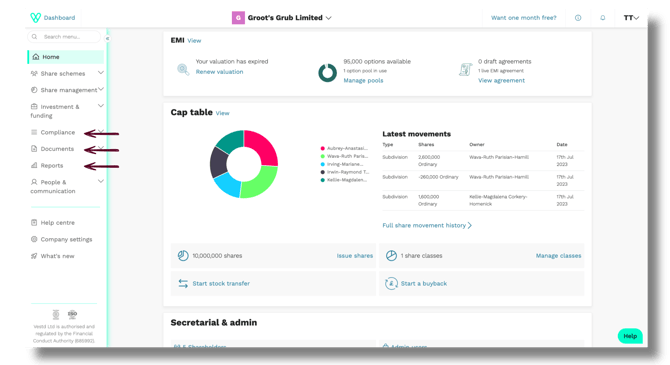
From your homepage, open the navigation panel on the left. Your documents are split across three sections, depending on what you're looking for:
- Compliance: company records and statutory filings
- Documents: every document stored, generated or filed on Vestd
- Reports: downloadable reports on your company's equity and activity
Compliance
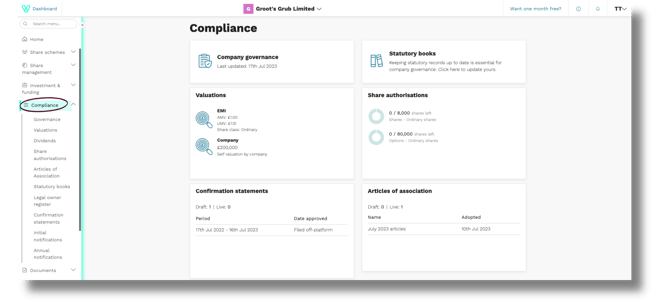
Go here for your company's formal records and filings.
This includes:
- Valuations: valuation reports we've prepared for your company, and HMRC approval letters
- Dividends: dividend vouchers, plus a spreadsheet of all dividends issued
- Articles of association: your current articles, plus previous versions
- Statutory books: the registers Vestd keeps up to date for you, based on the information recorded on the platform. This includes your legal owner register, share movement history and PSC history.
- Legal owner register: a record of your company's legal shareholders, which you can download as a spreadsheet
- Confirmation statements: previous confirmation statements filed with Companies House
- Initial notifications: spreadsheets of previously completed initial notifications
- Annual notifications: spreadsheets of previously completed annual notifications
Documents
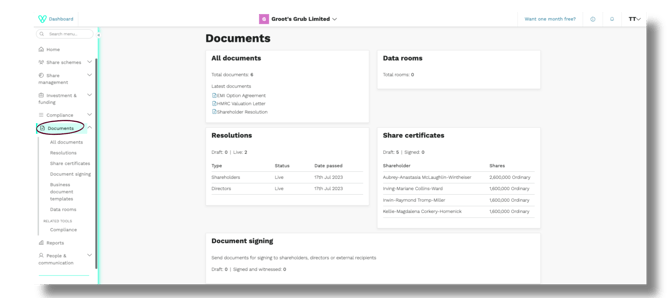
Go here to find a specific document, or to browse everything in one place.
This includes:
- All documents: every document stored, generated or filed on Vestd. To find a specific document, select Filter and search, then start typing the document's name in the search bar. You can also narrow the list by:
- Status
- Document type
- Companies House
- Resolutions: every resolution generated or stored on Vestd. You can also create a bespoke resolution from here.
- Share certificates: certificates generated when shares are issued or transferred. Vestd creates a draft certificate automatically and notifies you by email.
- Document signing: documents sent for signature using Vestd's document signing tool, such as advanced subscription agreements and ITEPA documents. Documents signed elsewhere on Vestd won't appear here.
- Business document templates: templates you can download for common company documents, such as investor consents, advanced subscription agreements (ASAs), subscription letters, term sheets and share subscription agreements
- Data rooms: documents you've added to data rooms you've created. What other users can do in a data room depends on their access level: editor, view only, or view and upload.
Reports
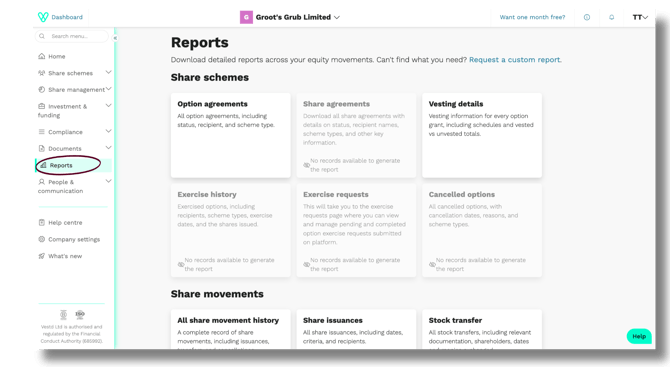
Reports work differently from the other two sections. Rather than storing existing documents, it's where you download reports based on your company's data on Vestd. Reports are grouped into five categories.
Share schemes
- Option agreements: all option agreements, including status, recipient and scheme type
- Share agreements: all share agreements, including status, recipient names and scheme types
- Vesting details: vesting information for every option grant, including schedules and vested and unvested totals
- Exercise history: exercised options, including recipients, scheme types, exercise dates and the shares issued
- Exercise requests: takes you to the exercise requests page, where you can view and manage pending and completed option exercise requests
- Cancelled options: all cancelled options, with cancellation dates, reasons and scheme types
Share movements
- All share movement history: a complete record of share movements, including issuances, transfers and cancellations
- Share issuances: all share issuances, including dates, criteria and recipients
- Stock transfer: all stock transfers, including relevant documentation, shareholders, dates and monies exchanged
Compliance
- Cap table: simulate your company's ownership structure in different scenarios, and download it as a spreadsheet or PDF
- Legal owner register: view your legal owner register and download it as a spreadsheet
Finance
- Financial report: options vested, lapsed and exercised, and exercise requests, across a date range you choose
- Expenses report: stock option expenses under your chosen valuation method, including fair values, vesting schedules and a monthly breakdown for "employee compensation expense" entries in your annual P&L
People
- Shareholders: your shareholders' names, emails and basic details
- Employees: your employees' names, emails and basic details
Need a report that isn't listed? Select Request a custom report at the top of the Reports page.
Downloading documents
When you open a document, it opens as a PDF in a new browser tab. To save a copy, use your browser's download icon. You can also use your browser's controls to zoom in, zoom out or print.
FAQs
Who can see these sections?
Only company admins (Super users, Editors and View-only).
Where can I find a previous version of our articles of association?
Go to Compliance, then Articles of association. You'll see your current articles and any previous versions.
Where can I find our HMRC approval letters?
Go to Compliance > Valuations. You'll see a list of your valuation types. Where an HMRC approval letter applies, you'll find a link to it on the right.
What's the quickest way to find a specific document?
Go to Documents > All documents, and click Filter and search. A search bar will appear, where you can start typing the document's name. You can also filter by status, document type or Companies House.
How do I download a document?
Open the document. It opens as a PDF in a new tab, where you can save it using your browser's download icon.
Why is my share movement history missing transactions?
If your company's historical cap table hasn't been uploaded, share movements from before you joined Vestd won't be recorded. Contact support@vestd.com to upload your historical cap table.
What's the difference between Documents and Reports?
Your Documents space holds files that already exist on Vestd, such as resolutions and share certificates. Reports is where you download reports generated from your company's data held on Vestd.
Why does a report say "No records available to generate the report"?
There's no data on Vestd for that report yet. For example, the Exercise history report stays empty until an option has been exercised.
Can I get a report that isn't listed?
Yes. Select Request a custom report at the top of the Reports page.
I can't find a document I'm looking for. What should I do?
Check All documents first, as it lists everything stored on Vestd. If it's not there, contact support@vestd.com and we'll help you find it.
Need support?
If you have any questions, our dedicated Customer Success team is here to help: support@vestd.com
Not onboard yet? Hop on a call.
Our team, content and app can help you make informed decisions. However, any guidance and support should not be considered as 'legal, tax or financial advice.'